
Last updated on
Oct 24, 2026

UK SF100 2013 free printable template
We are not affiliated with any brand or entity on this form

Fill out
Complete the form online in a simple drag-and-drop editor.

eSign
Add your legally binding signature or send the form for signing.

Share
Share the form via a link, letting anyone fill it out from any device.

Export
Download, print, email, or move the form to your cloud storage.
Why pdfFiller is the best tool for your documents and forms


End-to-end document management
From editing and signing to collaboration and tracking, pdfFiller has everything you need to get your documents done quickly and efficiently.
Accessible from anywhere
pdfFiller is fully cloud-based. This means you can edit, sign, and share documents from anywhere using your computer, smartphone, or tablet.
Secure and compliant
pdfFiller lets you securely manage documents following global laws like ESIGN, CCPA, and GDPR. It's also HIPAA and SOC 2 compliant.
What is UK SF100
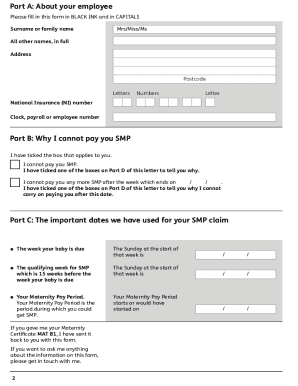
The Sure Start Maternity Grant Claim Form is a government document used by expectant mothers or parents to claim financial assistance for purchasing essential items for a new baby.
pdfFiller scores top ratings on review platforms




Who needs UK SF100?
Explore how professionals across industries use pdfFiller.

UK SF100 is needed by:
-
Expectant mothers in the UK receiving certain benefits
-
Parents under 20 applying for government assistance
-
Caregivers looking for support to buy baby essentials
-
Individuals needing financial aid for newborn-related expenses
-
Families seeking grants for maternity-related purchases
Comprehensive Guide to UK SF100
What is the Sure Start Maternity Grant Claim Form?
The Sure Start Maternity Grant Claim Form serves as a critical resource for new parents seeking financial assistance for essential baby gear. This form is specifically designed for individuals who are eligible to receive government support, making it invaluable for expectant mothers navigating early parenting costs.
This UK government baby grant form provides benefits to those fulfilling specific criteria, thereby helping ease the financial burden associated with bringing a new child into the family.
Purpose and Benefits of the Sure Start Maternity Grant Claim Form
The primary purpose of the Sure Start Maternity Grant Claim Form is to offer financial support that assists new parents with purchasing necessary items for their newborns. This grant is aimed at alleviating initial expenses and ensuring families can acquire essentials such as diapers, clothing, and other infant necessities.
-
The grant provides financial assistance for buying essential baby items.
-
It can significantly alleviate economic stress for families beginning their parenting journey.
Who Needs the Sure Start Maternity Grant Claim Form?
This form is intended for specific audiences, particularly expectant mothers who are under the age of 20 or are receiving certain benefits from the government. Understanding who qualifies to apply is crucial for ensuring that eligible individuals can access this important financial support.
Potential claimants include those receiving benefits such as Income Support, Jobseeker’s Allowance, or Employment and Support Allowance.
Eligibility Criteria for the Sure Start Maternity Grant Claim Form
Claimants must meet certain qualifications to successfully claim the grant, including age restrictions and benefit status. Without meeting these criteria, applications may be rejected, making it essential to understand what is required before applying.
-
Applicants must be under 20 years old or receiving specific government benefits.
-
Documentation such as proof of entitlement to benefits is required to establish eligibility.
How to Fill Out the Sure Start Maternity Grant Claim Form Online (Step-by-Step)
Completing the Sure Start Maternity Grant Claim Form online can be straightforward with the right guidance. Here’s a step-by-step approach to ensure accuracy and completeness during the online filling process.
-
Begin by accessing the online form through the necessary government portal.
-
Fill in your personal details, such as your name and National Insurance number.
-
Indicate your benefit status as required.
-
Double-check all entered information for accuracy before submission.
-
Sign and date the form as instructed.
-
Submit the form by following the indicated process on the site.
Common Errors and How to Avoid Them
Filling out the Sure Start Maternity Grant Claim Form can be tricky, and mistakes can lead to processing delays. Being aware of common pitfalls can enhance your chances of a smooth application process.
-
Failure to sign and date the form properly can cause a rejection.
-
Incorrect benefits information may also lead to complications.
-
Always review your form with a validation checklist after completing.
Submission Methods and Delivery for the Sure Start Maternity Grant Claim Form
Understanding how to submit the completed grant claim form is vital for timely processing. Applicants have several submission options to choose from, ensuring flexibility based on personal preference.
-
The form can be submitted online or via traditional mail, depending on convenience.
-
Deadlines for submission are crucial to maintain eligibility, so be aware of specific timeframes for your situation.
Tracking Your Submission and What Happens After You Submit
Once your application has been submitted, knowing how to track its status helps applicants stay informed about their claims. Here’s what you can expect during the process.
-
You can check the status of your submitted application via the designated tracking system.
-
After submission, you will receive communication regarding decision timelines and potential follow-ups.
Security and Compliance for the Sure Start Maternity Grant Claim Form
Your privacy and data security while filling out the Sure Start Maternity Grant Claim Form is of utmost importance. Understanding the measures in place can enhance your confidence in the process.
-
Data protection regulations ensure that personal information is handled securely.
-
pdfFiller implements advanced security features, safeguarding your documents during completion and transmission.
Enhance Your Experience with pdfFiller
Utilizing pdfFiller can simplify the process of filling out the Sure Start Maternity Grant Claim Form significantly. This platform offers several features specifically designed to enhance your user experience.
-
pdfFiller streamlines the form-filling process, making it user-friendly.
-
Security measures ensure that your sensitive information remains protected throughout the process.
-
Leverage pdfFiller’s capabilities for efficient document management and grant applications.
How to fill out the UK SF100
-
1.To begin, open your web browser and navigate to pdfFiller's website. Use the search feature to locate the Sure Start Maternity Grant Claim Form easily.
-
2.Once you find the form, click on it to access the fillable PDF. Familiarize yourself with the layout and various sections of the form.
-
3.Before completing the form, gather all necessary information, such as your surname, date of birth, National Insurance number, and details of any benefits you receive to ensure a smooth filing process.
-
4.Start filling in the required fields using pdfFiller's interface. Click into each field to enter your information, ensuring you provide accurate details as asked.
-
5.As you proceed, pay close attention to any checkboxes regarding your entitlement to benefits. Make sure to fill these out correctly to avoid delays.
-
6.If any corrections are needed, use pdfFiller’s tools to edit your entries—remember to sign and date any alterations you make, as instructions specify.
-
7.Once you have completed all fields, carefully review the entire form. Check for any missed items or errors to ensure everything is accurate before finalizing.
-
8.After confidently reviewing your form, use the save feature to store a copy on your device. You may also choose to download it as a PDF for your records.
-
9.To submit the form, follow the instructions provided for uploading or sending via your preferred method as specified by the UK government.

Who is eligible to apply for the Sure Start Maternity Grant?
Eligibility for the Sure Start Maternity Grant includes expectant mothers who are receiving certain means-tested benefits or are under the age of 20. Check government guidelines for complete details.
What is the deadline for submitting the claim form?
Claims for the Sure Start Maternity Grant must be submitted within specific timeframes, typically within three months of the child's birth. Be sure to check eligibility based on your circumstances.
How can I submit my completed form?
The completed Sure Start Maternity Grant Claim Form can be submitted electronically if filling through pdfFiller, or you may need to print and mail it as per the instructions provided on the form.
What supporting documents are required for the application?
Supporting documents typically include proof of identity and benefits received. Be sure to check the requirements on the form to ensure you have all necessary documents to support your claim.
Are there common mistakes to avoid on the claim form?
Common mistakes include incomplete fields, missing signatures, and errors in personal information. Always double-check your entries to ensure everything is filled out correctly before submission.
How long does it take to process the application?
Processing times for the Sure Start Maternity Grant can vary, but it generally takes several weeks. It's advisable to factor this into your planning for required financial support.
What should I do if my application is rejected?
If your application for the Sure Start Maternity Grant is rejected, review the reasons provided. You may be able to appeal the decision or reapply if the situation changes.
UK SF100 Form Versions
Related Content
Related Forms




Get the latest insights from our blog


If you believe that this page should be taken down, please follow our DMCA take down process
here
.
This form may include fields for payment information. Data entered in these fields is not covered by PCI DSS compliance.